
I’ve been writing for well over a decade in some form or another. Switched between a ton of writing tools—Google Docs, Grammarly, LanguageTool, Notepad++, MS Word… you name it, I tried it at some point. All great tools. They serve the purpose they’re built for, and you can still produce great pieces with any of them.
However, during my recent subscription bloat purge, I—after a long time—set out to look for a free, open-source solution. Not with too much hope, if I’m being honest. I’ve always known GitHub, but it was only last year that I really started exploring it. So that’s where I began.
After an afternoon of going through repositories and installing then deleting the mediocre ones, I found Lexicon. I’ve been using it since. It’s what I’m writing in right now. I’m on the latest beta.
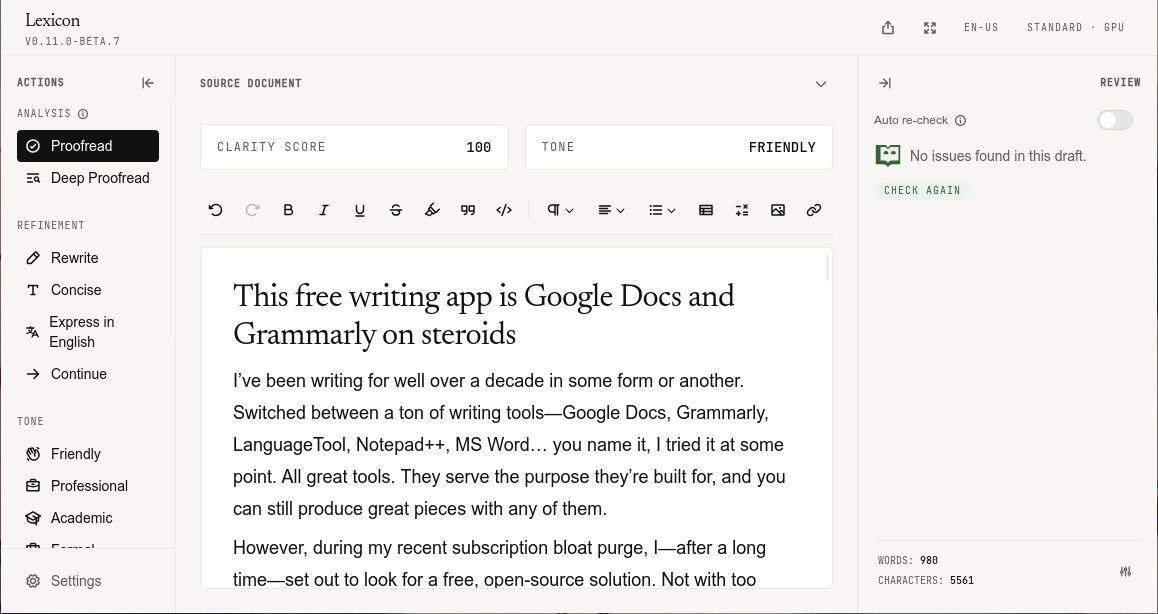
So, why am I so smitten by it? Well, where do I start… It’s a normal app for Windows, Mac, and Linux. No code. No terminal. That’s the part that puts people off GitHub, and it doesn’t apply here.
Getting it installed
Grab the installer from the releases page. Take the latest pre-release—the beta—not the row marked Latest. Latest is the older stable app. The beta is the one I’m in, and it’s the one this piece describes. The browser add-on below has to be from that same beta, or it won’t talk to the app.
The installers aren’t signed yet. On Windows you may get “Windows protected your PC.” Click More info, then Run anyway. On a Mac, Control-click the app and choose Open. Only download from that releases page. Linux, for now, means a .deb—Ubuntu, Mint, Debian, that crowd.
It’s a young app. So far, the developer is actually pushing out updates, fixes, and new features fairly regularly. Not a repository that went quiet after the first upload. Also, during my testing, I found the beta almost as stable as the actual stable version.
The Google Docs part
So, how does it replace Google Docs? It does the normal writing job. Headings, lists, links, bold, the rest of it. You can paste text from a Word file if the draft already lives there. Plain text, HTML, and Markdown translate well too. If you get distracted easily, there’s a focus mode. It clears the clutter so you have all eyes on the draft.
The look is pretty easy to change in settings. Font size, line spacing, and more. There’s an OpenDyslexic typeface if the default font fights you. The first thing I changed was the font size and the line spacing, so the page had room to breathe. Not sharing my settings here. That’s a taste thing, and it depends on your screen.
Walk away mid-draft and you don’t have to remember to save. It survives restarts and shutdowns, like Notepad++. When you’re done, you can export HTML (plain or styled), Markdown, plain text, Word, PDF, or EPUB. There are templates too, like academic papers, novels, or blog posts.
Sounds impressive already, right? Now, the Grammarly part.
The Grammarly part
Grammar and spelling do not need an AI model. The check runs on your computer as soon as the app is installed. No account. The draft isn’t sent off to be “improved” somewhere else.
The optional download is Lex’s Engine, in settings. One click. Three sizes: Light, Standard, and Quality. I have an okayish laptop, so I went with Standard. Quality is about 16.5 GB. Don’t grab it on a whim. If you already use local models through Ollama or LM Studio, you can connect those in the advanced section.
Proofread is the grammar pass. It works even if you never download a model. Deep Proofread adds the model’s notes on clarity, on top of the grammar.
There’s also rewrite, tone, and structure to make your draft friendlier, tighter, more formal, or to extract a summary or key points. I just use Proofread once a draft is done. The rest is only as good as the model, and a small one will not write like ChatGPT or Claude. Don’t expect it to.
You can also teach it words to leave alone by adding it to your personal dictionary. For example, a character name, a brand, or some jargon that keeps getting flagged.
It works in your browser too
The same check ain’t limited to the Lexicon window. It can run in Chrome or Firefox, in text fields on the page, like an email, a blog box, or a forum reply. Not Google Docs, though—that isn’t supported yet.
The desktop app has to be open or minimized in the tray. If it isn’t running, the add-on has nothing to check with.
Chrome
- On the releases page, open the latest pre-release. Not the one marked Latest.
- Download the Chrome
.zip. - Unzip it, and keep that folder. Delete it later and the add-on dies.
- Go to
chrome://extensions. - Turn on Developer mode. That’s only how Chrome installs an add-on that isn’t in the store yet.
- Click Load unpacked, and select the unzipped folder.
Firefox
- From that same pre-release, download the
.xpi. - Go to
about:debugging, then This Firefox. - Click Load Temporary Add-on, and pick the
.xpi. - You need Firefox 142 or newer. It unloads when you close the browser. You’ll do this again next time. (Annoying. True.)
If that feels like homework, skip the add-on. The app is what I’m writing in.
Should you switch?
I’m not telling you to cancel Grammarly tonight. Docs and Grammarly are fine. They also want an account, and usually a subscription, for the boring job of holding a draft and marking a comma.
Lexicon does that job on the computer you already own for free with no account. The AI is optional, and it’s only as sharp as the model the machine can run. If the laptop groans, leave the model alone and use the grammar check.
The piece still gets written. That’s the part that matters.

Ali Arslan
Ali began his journey as a full-time Tech Journalist in 2021. He’s been a tech enthusiast all his life, starting with a 286 PC gifted to him at the age of 7.
With time, he’s grown into a power user of Android, Linux, Windows, and all things AI, which are the main focus of his writing here at Tech Unbloated. He’s also got a proficient track record for bricking (and sometimes unbricking) Android phones while trying to push the hardware and software to their limits.
Ali has an Advanced Diploma in Business Management from London, UK, and is an English Literature graduate from Punjab University, Pakistan. Other than Tech Unbloated, he’s written for big tech publications like MakeTechEasier, MakeUseOf, How-To Geek, and LimeWire—however, most of his previous work was as a ghostwriter for high-profile clients.
Before becoming a full-time writer, Ali tried his luck at music production, graphic design, teaching, business management, web development, and dropshipping. His writing often reflects all these experiences he’s had in life.
Discussion
Leave a mark
Corrections, disagreements, and the thing I missed. Comments are read before they go up.
No comments yet. Go on — be first, and make it count.
Comments stay off until you say so.
Enable comments in cookie preferences to read and join the thread. No login. No ads in the box.